Registration Workflow
Starts when the user taps " Register Palm " in Partner App.
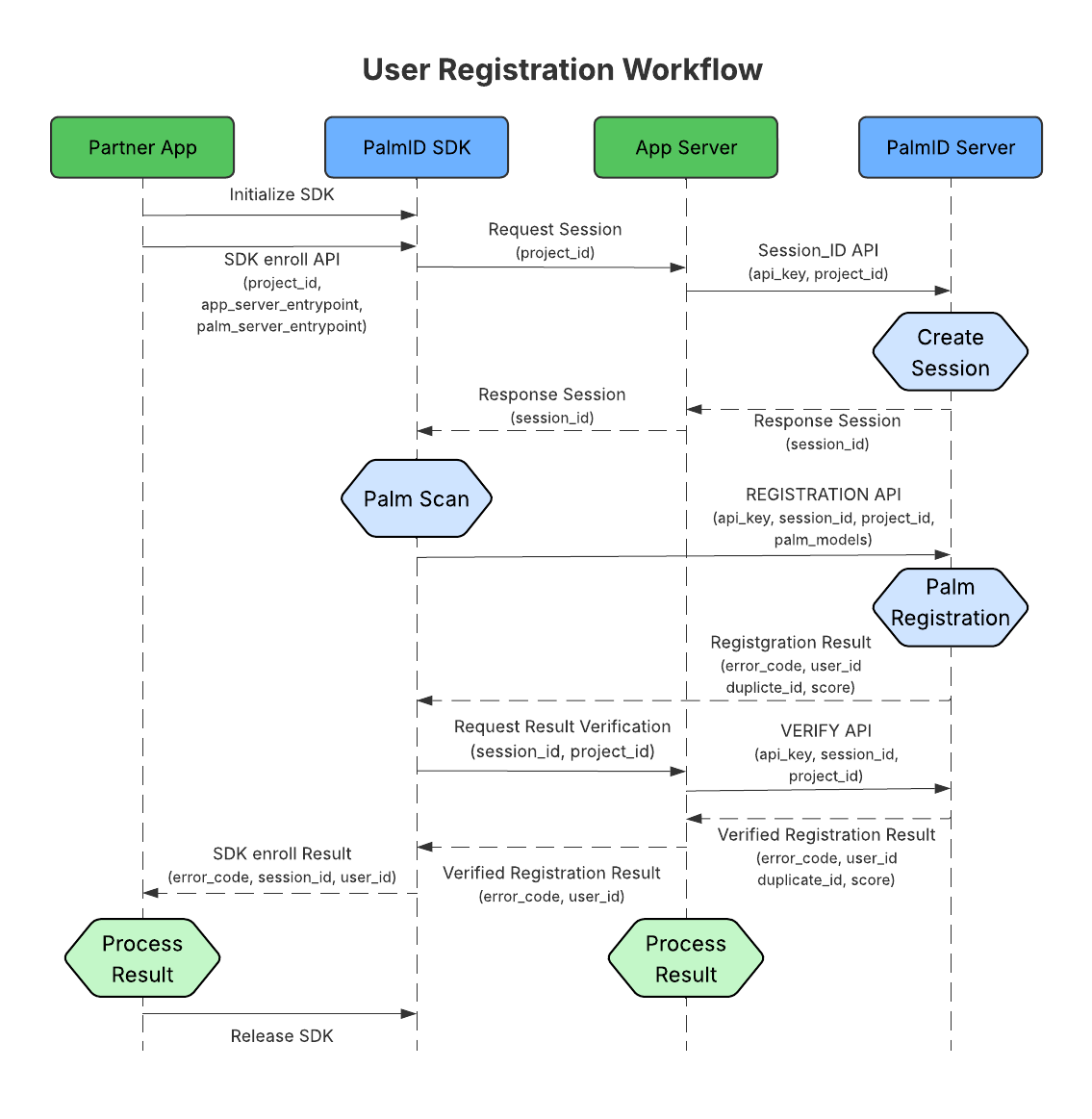
Step 1: Initialize SDK
Call SDK API
initialize(API_KEY, PROJECT_ID, AppServer_EntryPoint)Call SDK API
enroll()to start palm enrollment.
Step 2: Create Session
SDK → App Server → PalmID Server (SESSION_ID API).
PalmID Server returns
session_idvia App Server.***
API_KEYis stored only on the App Server. ***
Step 3: Palm Scan
SDK opens camera, guides user to scan palms.
Extracts palm features and sends encrypted models to PalmID Server.
Step 4: Palm Registration
PalmID Server stores encrypted models with a randomly generated user_id.
Returns
user_idto SDK.
Step 5: Verify Result
SDK notifies App Server of completion.
App Server gets the verified registration result from PalmID Server (VERIFY API and stores
user_idin its database.
Step 6: Release SDK
App display success/fail message.
Call SDK API
release().
14 August 2025